Analyze construction floor plans
instantly with AI
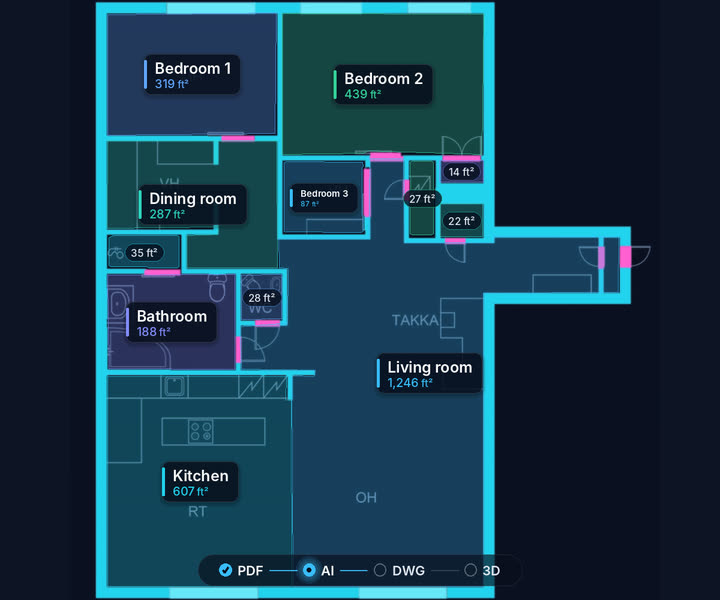
Manual takeoff on a PDF plan takes 4 hours. FloorScan does it in 30 seconds, with native DXF AutoCAD and Excel export ready to use.
Free, no credit card · every module open for 30 days
Used by professionals at
See FloorScan in action
Watch the full demo and see how to analyze a plan in under 30 seconds.
Everything you need to
analyze your plans
From raw PDF to structured data in a fluid workflow.
AI Detection
Automatically identifies doors, windows, load-bearing walls and surfaces from any construction PDF with over 90% accuracy.
Manual correction
Refine each detection. Modify types, adjust surfaces, remove false positives - total control without restarting the analysis.
Excel Export
One click to get a structured spreadsheet with quantities, surfaces and counts per element - ready for your bill of quantities.
Annotated PDF
Export a professional PDF with colored boxes, labels and summary page for your client presentations.
Large-scale accuracy
Process large multi-room plans with hundreds of elements. What takes hours manually takes seconds with FloorScan.
Instant results
From PDF import to complete detection report in under 5 seconds. Batch processing coming soon for enterprises.
Explore
Five steps to
complete analysis
PDF Import
Drag your construction plan in PDF format. Or load our sample file to test immediately.
Crop
Select the area of interest with the interactive cropping tool. Focus on what matters.
AI Detection
Our AI model analyzes the plan and detects all architectural elements with confidence scores.
Validation
Verify, correct or complete each detection in the interactive validation interface.
Export
Download your annotated PDF and Excel report with complete quantities and detailed surfaces.
Built for
construction professionals
From small residential projects to large commercial developments.
General contractors
Instantly quantify the materials needed. No more manual counting of doors and windows before a tender.
Estimators
Automate the tedious first pass. Focus on verification and value engineering rather than data entry.
Architects & BIM
Validate existing plans, quickly generate surface schedules and verify element counts.
Real estate developers
Analyze hundreds of unit plans at once. Generate standardized reports across your entire portfolio.
Our users
around the world
More than 1,300 construction professionals, architects, general contractors, estimators, land surveyors and BIM modelers, use FloorScan daily on their projects.
Real customers. We credit the company, never the person: a card shows initials at most.
Single-family home builder
D.R. Horton
$34.3B revenue, 14,341 employees
Single-family home builder
Lennar
$34.2B revenue, 12,532 employees
General contractor
Turner Construction
$28.3B revenue, 15,000 employees
Construction economist
Rider Levett Bucknall
4,000+ professionals across 40+ countries
Construction economist
Currie & Brown
General contractor
ACS
€41.6B revenue, 157,284 employees
General contractor
Ferrovial
General contractor
HOCHTIEF
€27.8B revenue, 41,575 employees
General contractor
GOLDBECK
Frequently asked questions
Everything you need to know before getting started.
Book a call
Talk with our team
A question, a suggestion, a problem or just want to know more? Book a 30-minute call with us.